Automatic achievements
An automatic achievement can reward you for completing your reading task, recording focus time, or earning attribute XP. You choose what counts and how much is needed. ulives tracks the records, unlocks the achievement when its conditions are met, and lets you claim its configured rewards.
Automatic tracking works in Standard Card, Checklist Pill, and Countdown lists. The display style changes where you see progress and claim, not what the achievement tracks.
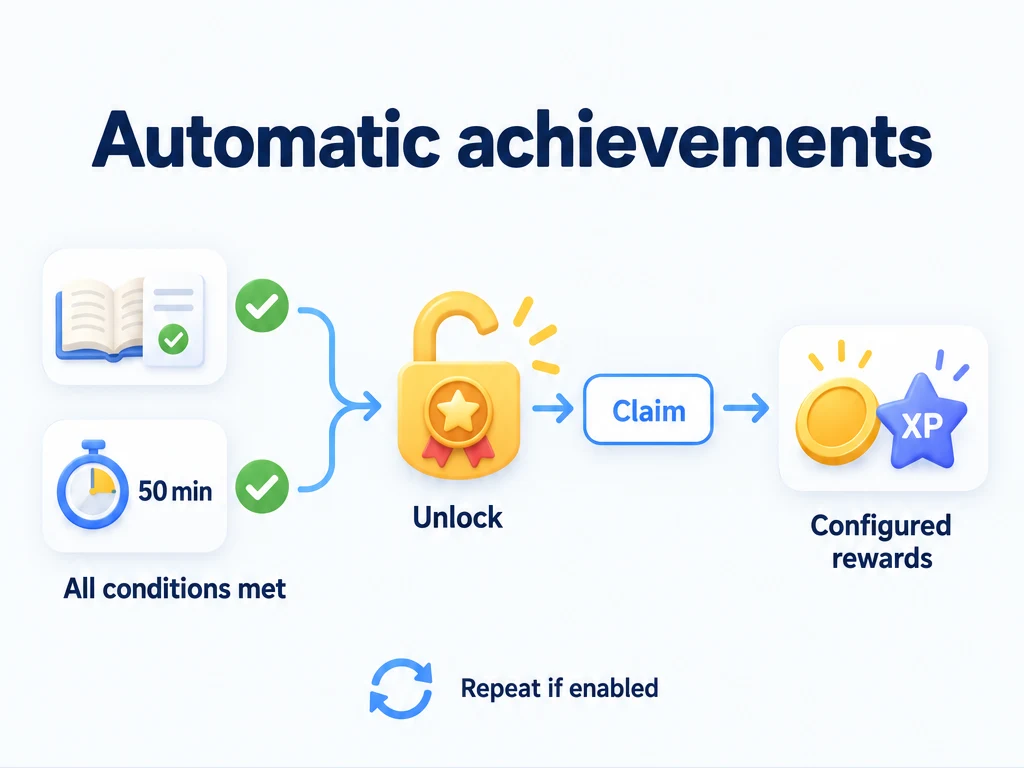
Set up a 50-minute focus milestone
Creating or saving automatic conditions requires Premium. Use the profile where you record your activity. Create any task, item, or attribute you want to select before adding a condition for it.
- Add an achievement named "Accumulate 50 minutes of focus" and enable Automatic tracking.
- Add the total focus minutes condition and set its target to 50.
- Leave the achievement non-repeatable for a milestone you want to earn once. Decide whether to ignore earlier records using the setting explained below.
- Optionally configure an item or attribute XP reward, then save.
- Record focus time in ulives. Once the condition reaches 50 minutes, open the achievement details and use Claim.
Two recorded 25-minute sessions contribute 50 minutes. The condition counts recorded minutes, not the number of sessions. If you configured 10 XP for an attribute, claiming gives that reward; reaching 50 minutes and claiming are separate steps. All targets and reward amounts in this guide are examples, not recommended defaults.
Start with one condition
| Goal | Condition and target | What contributes |
|---|---|---|
| Finish a first reading session | Specific task completions; choose your reading task; target 1 | Completing that task in ulives |
| Build up focus time | Total focus minutes; target 50 | Recorded focus duration across focus tasks |
| Buy a travel charm | Item purchases (total); choose the charm; target 1 | Buying that item from your shop |
| Earn Strength XP | Attribute XP gained; choose Strength; target 100 | XP gained by that attribute |
Leave these achievements non-repeatable if each is a single milestone. A condition for an item you buy is separate from the reward the achievement gives: buying a charm could unlock an achievement that rewards Strength XP, for example.
What can a condition track?
| Records | Available condition types |
|---|---|
| Tasks | Total completions; today's completions; completions of a specific task; consecutive completions of a specific task |
| Focus | Total minutes; today's minutes; total minutes for a specific focus task |
| Items | Purchases, purchase consumption, uses, and gains, each with total and daily variants; daily inventory amount |
| Attributes | Levels gained; XP gained; reaching a specified level today |
Item conditions select a particular item. Purchases count the quantity bought, while purchase consumption counts the quantity of the selected item spent to buy things. For example, buying one charm for 20 coins contributes 1 to the charm's purchases and 20 to coins consumed on purchases. Inventory conditions check how much you hold, rather than how much you have ever gained.
A specific-task streak follows consecutive task periods, so do not assume that three completions mean three calendar days. Use the ordinary specific-task completion condition when you just want a cumulative count.
Include earlier activity or start fresh
When adding a cumulative condition, use Ignore historical records if this goal should start from the condition's creation. Leave it off to include earlier matching records in the current profile. This setting does not delete those records.
Suppose the target is 3 completions of your reading task, with the achievement set to non-repeatable:
| When you check | Include history | Ignore history |
|---|---|---|
| Before creating the condition, you already completed the task twice | Those 2 completions can count | Those 2 completions are excluded |
| After saving, before another completion | 2 of 3 | 0 of 3 |
| Complete the task once after saving | 3 of 3: unlocked | 1 of 3: still locked |
| Complete it twice more after saving | Already unlocked | 3 of 3: unlocked |
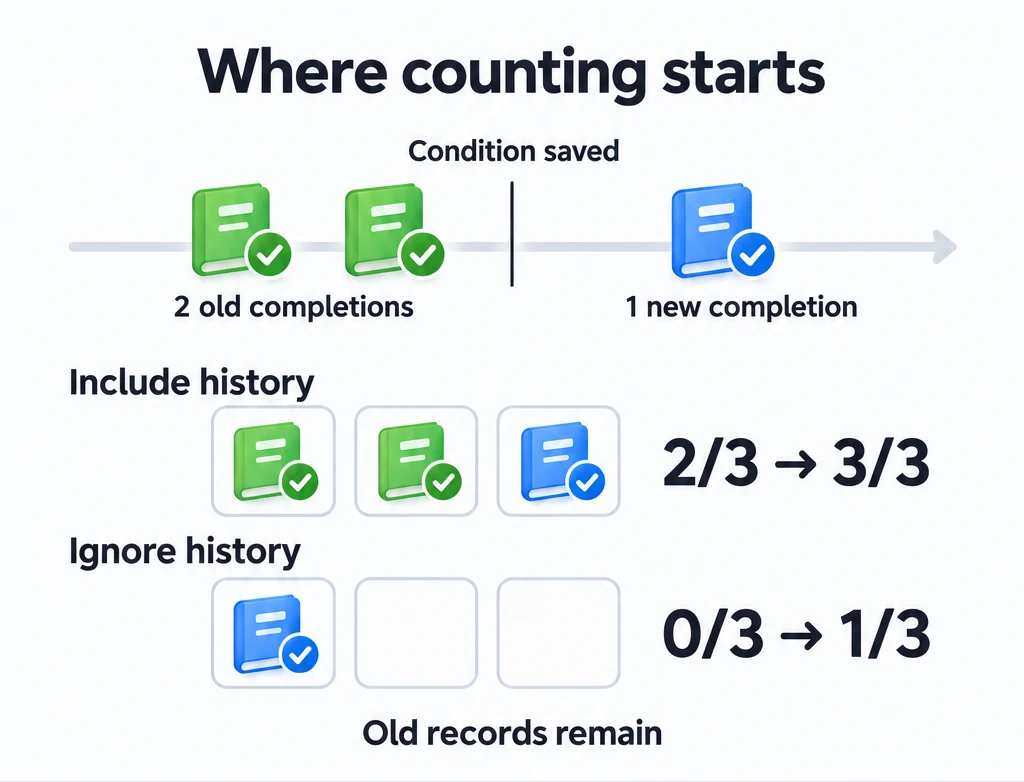
For this fresh-start example, enable Ignore historical records before saving the new condition. Daily conditions already use today's records, and the history setting is unavailable for them. Existing history can unlock a goal as soon as you create it when you leave history included.
Reward yourself for keeping up with reading
Add "Complete my reading task 12 times", enable Automatic tracking, and choose Specific task completions. Select the reading task and set the target to 12.
Make the achievement repeatable to earn a reward for each further 12 completions. With history ignored when you create the condition, the first reward unlocks after 12 new completions, the second after 24, and the third after 36. This counts task completions, not books, and does not reset at the start of a year. A target of 1 gives a cycle for each completion.
You can keep manual book-title entries beside this milestone in a Checklist Pill list. The books count toward list completion; the repeatable milestone earns its own rewards without contributing to the list percentage.
Condition scope and achievement repetition
The condition chooses which records count, such as total focus minutes or today's focus minutes. The achievement's non-repeatable/repeatable choice decides whether the whole goal can unlock again. There is no separate repeat switch for each condition.
| Setup | Result |
|---|---|
| Total focus minutes 50 + non-repeatable achievement | Unlock once at 50 minutes |
| Total focus minutes 50 + repeatable achievement | Unlock at 50, 100, 150 minutes, and so on |
| Today's focus minutes 50 + repeatable achievement | Unlock at most once per day when that day's minutes reach 50; 150 minutes today does not give three cycles |
Today's conditions start a new daily count the next day. Yesterday's unfinished daily progress does not carry over. To reward a daily goal again, use a daily condition with a repeatable achievement.
Combine conditions for one reward
Add more than one condition when the reward should require all of them. For example, "Study and review" could require 50 total focus minutes and 2 completions of a review task. Recording 50 minutes alone does not unlock it. There is no Any-condition option: every condition must be met for the same achievement cycle.
Two cumulative conditions, repeated together
Make "Study and review" repeatable. Set both conditions to ignore history when creating them, so these totals start at zero:
| Recorded totals | Focus target: 50 per cycle | Review target: 2 per cycle | Total unlocked cycles |
|---|---|---|---|
| 100 minutes, 0 reviews | Enough for 2 cycles | Enough for 0 | 0 |
| 100 minutes, 2 reviews | Enough for 2 cycles | Enough for 1 | 1 |
| 100 minutes, 4 reviews | Enough for 2 cycles | Enough for 2 | 2 |
| 125 minutes, 4 reviews | Enough for 2 cycles, plus 25 minutes | Enough for 2 | 2; the third still needs 25 minutes and 2 reviews |
| 150 minutes, 6 reviews | Enough for 3 cycles | Enough for 3 | 3 |
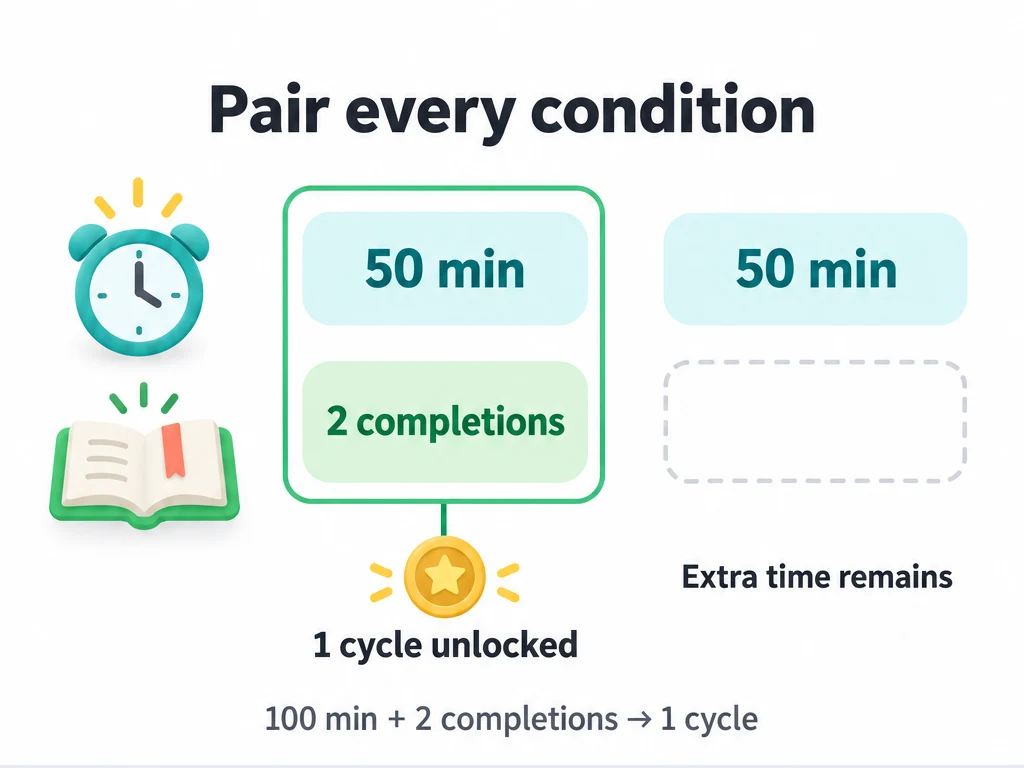
For the second reward, each cumulative condition must reach its own second threshold: 100 minutes and 4 reviews. One condition getting far ahead cannot replace the other. Extra cumulative progress is retained for later cycles, although a condition's progress display can stop at its current target while it waits for the others.
Claiming does not erase those extra 25 minutes or restart the underlying task and focus records. If each cycle rewards 10 XP and 1 study token, claiming two unclaimed cycles gives 20 XP and 2 tokens. A cycle you already claimed is not paid again.
A daily condition alongside a cumulative condition
For "Read and focus", combine today's focus minutes (target 20) with cumulative completions of your reading task (target 2), and make the achievement repeatable. Start the task condition with history ignored.
| Day and activity | Result |
|---|---|
| Monday: 40 focus minutes today, 4 reading completions in total | Unlock 1 cycle, not 2: the daily condition allows at most one cycle that day |
| Tuesday: no focus yet, still 4 reading completions in total | No new cycle; Monday's minutes do not meet Tuesday's condition |
| Tuesday: record 20 focus minutes, still 4 reading completions in total | Unlock cycle 2: today's condition is met and the task total reaches its second threshold |
| Wednesday: record 20 focus minutes, still 4 reading completions in total | No cycle 3 yet; reach 6 task completions to meet that condition's third threshold |
If you need a one-off milestone as well as an ongoing reward, create two achievements. A single achievement does not let you mark one condition non-repeatable and another repeatable.
Where to claim the reward
Meeting all conditions unlocks a cycle. Claim then grants the item and attribute XP rewards you configured. Several completed, unclaimed cycles can be collected together; you do not have to claim one before you can make progress toward the next.
| List style | Where to check progress and claim |
|---|---|
| Standard Card | Progress and Claim appear on the card. You can also open details to review rewards and claim. |
| Checklist Pill or Countdown | Tap the achievement to open details, then check progress and Claim there. Neither appears on the pill or countdown face. |
Manual completion gestures cannot bypass automatic conditions. A non-repeatable achievement unlocks once. Repeatable entries can show ×N completed cycles and are excluded from both the completed count and total used for the list's 100% reward.
Common questions
The progress looks wrong. What should I check?
Open the achievement list, or return to the app and give it a moment before checking again. Progress is not guaranteed to stay current while the app is closed. Check the selected task or item, the condition's daily or cumulative scope, and whether historical records are included. With several conditions, check the one still waiting for its next threshold.
Undoing a task completion can reduce unfinished progress; it does not necessarily remove an already unlocked cycle. If you are using another device, check that it has the right profile data or import your data there. See the overview.
Which operations require Premium?
Creating automatic conditions or saving changes to them requires Premium. Viewing existing conditions and claiming rewards for completed cycles do not require Premium.
Can I start over or make the achievement manual?
When editing an automatic achievement, Reset progress may be available. Resetting clears the tracked cycles for that achievement. Use it only if you mean to start over after changing your goal.
To make the entry manual, turn off Automatic tracking, clear the conditions, and save. If a non-repeatable achievement has already unlocked and you want to earn it repeatedly, make it repeatable or create a new achievement instead.