Focus sessions
Use Focus to time a reading session, work on a report, or practise an instrument. If you want rewards for that time, create a Focus Task such as “Study” and give it currency and attribute XP rewards.
Regular tasks track whether you did something. Focus Tasks track time spent; completing one does not complete the other.
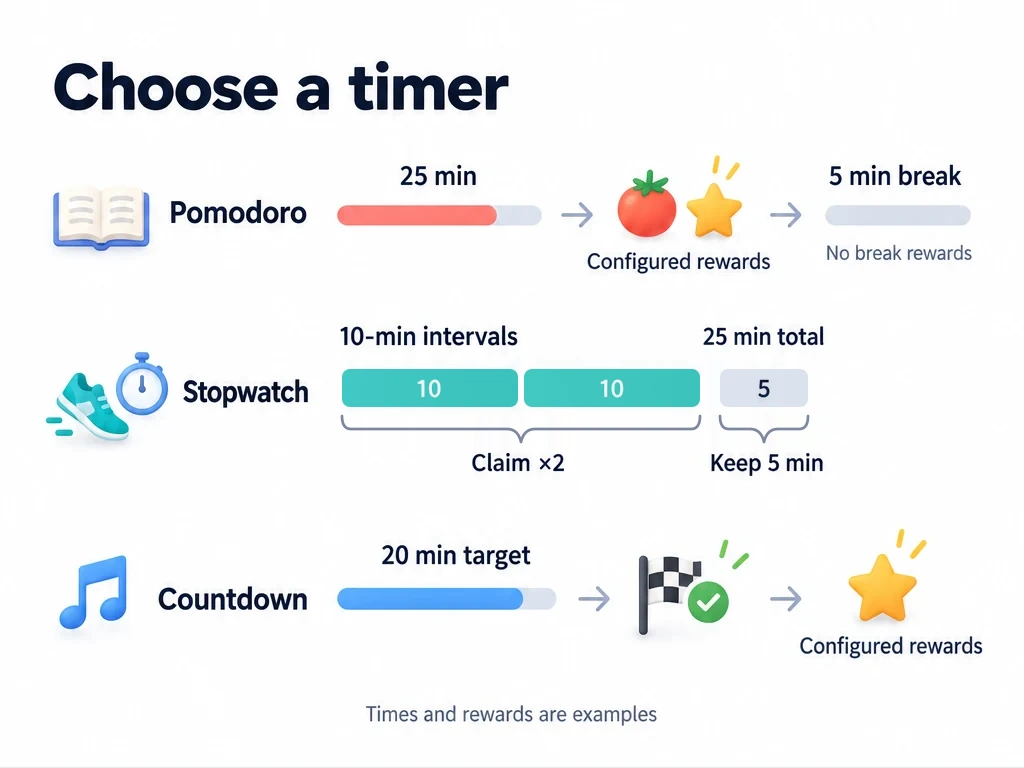
Choose a mode for what you want to do
| What you have in mind | Mode | Example setup | How you earn rewards |
|---|---|---|---|
| Read with regular breaks | Pomodoro | 25 minutes of work, then a 5-minute short break | Finish a full work segment to earn its reward. Breaks do not grant rewards. |
| Write or draw without deciding when to stop | Stopwatch | 1 coin for every 15 minutes | Finish the session to accumulate time, then claim rewards for complete intervals. |
| Practise piano for 20 minutes | Countdown | Set a 20-minute target | Reach the target to earn the reward. |
These durations and rewards are examples you can change. Pomodoro defaults to 25 minutes of work, a 5-minute short break, and a 15-minute long break.
Set up different Focus Tasks for study and exercise
If you are used to focusing directly on an ordinary task in LifeUp for Android, ulives keeps Focus Tasks separate so you can reuse a timing and reward setup across different activities. For example, keep one “Study” Focus Task for reading, vocabulary practice, and revision, while ordinary tasks record goals such as “Read chapter 3” or “Review 20 words”. Select Study yourself each time you time one of those activities.
Keep a separate Exercise Focus Task for workouts. Study and Exercise each have their own durations and rewards, so studying can earn Tomatoes and Study XP while exercise earns your custom Exercise Coins and Fitness XP.
| Focus Task and use | Mode and timing | Example currency + attribute reward | When you receive it |
|---|---|---|---|
| Study: read a chapter, then rest | Pomodoro: 25-minute work segment, 5-minute short break | 1 Tomato + 10 Study XP | After each full work segment; no rewards during breaks |
| Exercise: time a workout without a fixed end | Stopwatch: 10-minute reward interval | 1 Exercise Coin + 5 Fitness XP per interval | Finish to accumulate time, then claim complete 10-minute intervals |
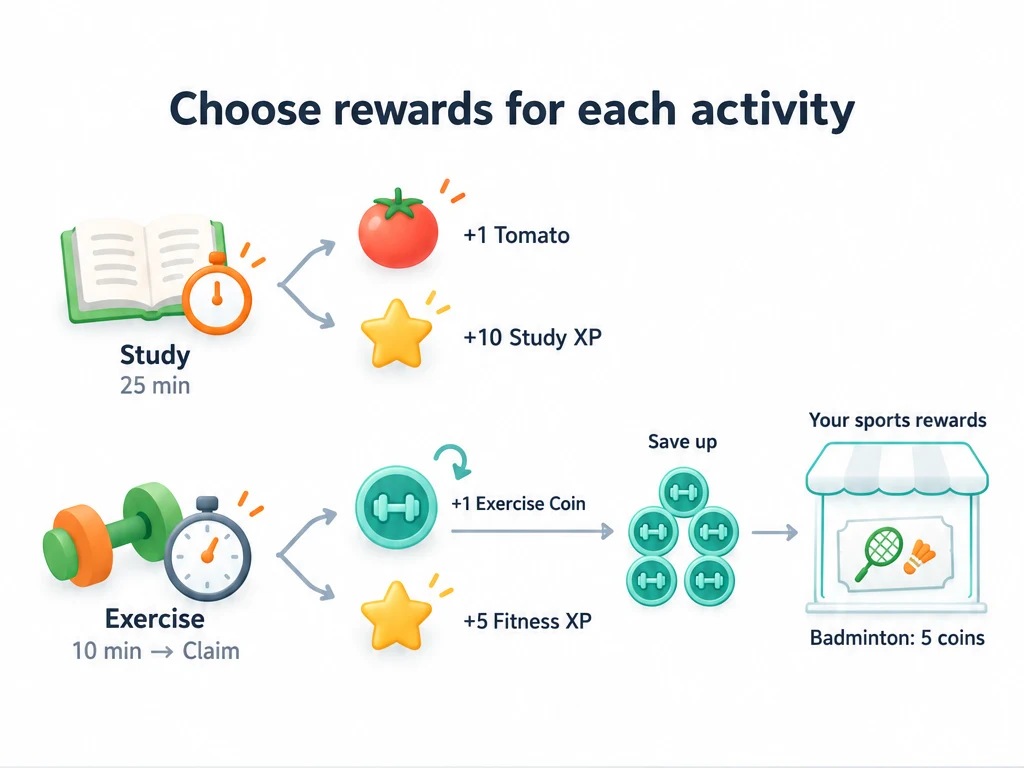
Tomatoes and Exercise Coins are currency items you create or choose; Study and Fitness are attributes you create or choose. The names, quantities, and times here are examples, with no required pairing between an activity and a reward. You select the Focus Task yourself; ulives does not detect whether you are studying or exercising.
- In Shop, create an item called “Exercise Coins” with its own icon and put it in an item list in the Currency group. For a currency you only earn and spend, turn off purchasing and Usable. Create or choose the Fitness attribute; prepare Tomatoes and Study too.
- On your phone, open Focus Mode from Status. On a phone or tablet with a larger-screen sidebar layout, open Focus from the sidebar.
- Open the task picker and create “Study”. Set Pomodoro work to 25 minutes and the short break to 5 minutes. Add Tomato as an item reward with quantity 1, and Study as an attribute reward with 10 XP; save.
- Create “Exercise”. Enable its Stopwatch reward interval and set it to 10 minutes. Add Exercise Coins as an item reward with quantity 1, and Fitness as an attribute reward with 5 XP; save.
- Before starting, select Study with Pomodoro or Exercise with Stopwatch. Selecting a Focus Task does not lock you to that mode.
Each task keeps its own timing settings. Within a task, the three modes share one reward setup unless you enable “Set rewards by mode”. For a fixed 20-minute workout, for example, set Exercise’s Countdown target to 20 minutes, enable that option, and give Countdown 2 Exercise Coins + 10 Fitness XP while keeping Stopwatch at 1 Exercise Coin + 5 Fitness XP per 10-minute interval. Countdown pays out only when you reach its target.
You can also choose No Associated Task to use the timer alone, but it will not save a Focus session record or grant Focus rewards.
Reusing a Focus Task and linking a task
Selecting Study for different activities is manual reuse, not a formal link between several ordinary tasks and one Focus Task. For a shortcut from an ordinary task, touch and hold it in the task list and choose Focus. If it already has a linked Focus Task, ulives opens Focus and selects that task. Otherwise, it creates a linked Focus Task using the ordinary task’s name and description, then opens Focus with it selected. Check its timing and add rewards before starting; this shortcut does not copy the ordinary task’s rewards.
Formal links currently pair one ordinary task with one Focus Task. Finishing the timer does not mark the ordinary task complete; mark it complete separately when its goal is done. Linking several ordinary tasks to one Focus Task is planned, but is not available yet. For now, open Focus and select Study yourself when you want to reuse it.
Spend Exercise Coins on sports rewards
In Shop, create your own “Sports rewards” group, then add item lists such as “Outings” and “Equipment” inside it. This is a grouping you build, not a built-in sports store. Add rewards you look forward to and enable purchasing for each one. Set the purchase cost to the Exercise Coins item, not the ordinary Coins item:
| Reward item | Item list | Example price | When to use it |
|---|---|---|---|
| Badminton outing ticket | Outings | 5 Exercise Coins | When you go for an extra badminton outing |
| Swimming ticket | Outings | 12 Exercise Coins | When you take a swimming outing |
| Sports equipment voucher | Equipment | 30 Exercise Coins | When you buy a sports accessory within your own budget |
Make these tickets usable and leave additional use effects empty. Buying deducts Exercise Coins and puts the ticket in Inventory; use it there when you take the real-world reward. You arrange and pay for the outing or equipment yourself. See Items and inventory for the item setup.
The group organizes items; it does not automatically set their currency. Choose Exercise Coins in each price. Fitness XP records your growth and is not spent on these purchases. The prices above are starting suggestions: adjust them after seeing how much you earn, and keep routine exercise available without requiring a ticket.
Pomodoro: work, then take a break
With Study’s 25-minute work segment and 5-minute short break, read for 25 minutes to earn 1 Tomato + 10 Study XP, then rest for 5 minutes. Start the next work segment after the break. Long breaks do not grant rewards either.
When the next segment is ready, you can skip the break or switch back to Work.
Stopwatch: accumulate time across sessions
Suppose Exercise has the 10-minute reward interval above, worth 1 Exercise Coin + 5 Fitness XP. Starting with no unclaimed time:
| Finished, accumulated time | Available reward | Time left after claiming |
|---|---|---|
| 7 minutes | Not enough to claim yet | All 7 minutes are kept |
| 25 minutes | 2 Exercise Coins + 10 Fitness XP | 5 minutes carry over |
Finishing a session adds its time to that Focus Task’s unclaimed total. Exercise’s time stays separate from Study’s. Claim pays out complete intervals and keeps the remainder. Reset clears unclaimed time without taking back rewards you already claimed.
What if you finish early or discard a session?
| Action | Result |
|---|---|
| Finish Pomodoro or Countdown early | Duration may be recorded, but the segment grants no XP or item rewards. |
| Finish Stopwatch with a Focus Task selected | Time joins the unclaimed total, ready to claim by reward interval. |
| Discard the session | No session record or reward for that run. |
Common questions
| Question | What to check |
|---|---|
| I completed my reading task in the list. Why didn’t I get Focus rewards? | Completing a regular task does not settle Focus rewards. Those depend on the Focus timer; Stopwatch also requires you to claim them. |
| Why can’t I claim Stopwatch rewards? | Select a Focus Task, set a reward interval, and finish enough timed sessions to reach one interval. |
| Why can’t I switch profiles? | Finish or discard the current Focus session. Pausing is not enough. End Focus before restoring a backup too. |
| Why can’t I create or reactivate a Focus Task? | Without Premium, you can have up to 5 active Focus Tasks; archived tasks do not count. At the limit, archive one you no longer need before adding or reactivating another, or use Premium. |
| Why hasn’t the Live Activity updated? | Background updates can lag. Open Focus to check the timer. |
Live Activity is an iOS feature; use the in-app timer to check the session on other platforms.