Currencies
Use coins for everyday tasks and save them for a Movie ticket. If you want a separate reward for a difficult goal, you could award diamonds instead.
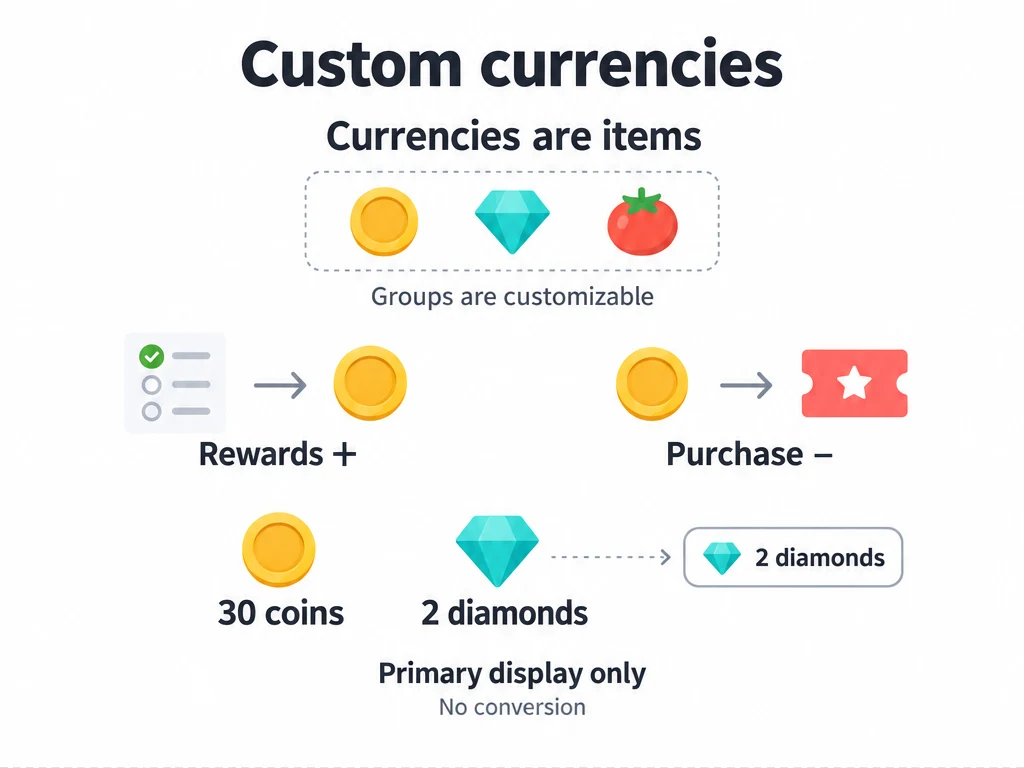
Every currency in ulives is a customizable item. The built-in Currency group includes Coins, Diamonds, and Tomatoes as examples; you can change their names, icons, and uses. A currency balance is the quantity of that item in Inventory.
Start with one currency
You need a currency item, a task that rewards it, and something you want to buy. You can use the existing Coins item without creating anything new.
- Open a task's reward settings and add Coins, for example 1 coin for a reading task.
- Create a Movie ticket in Shop and set its purchase cost to 20 coins. See Make your first Movie ticket for the full setup.
- Complete the task to earn coins. When you have enough, buy the ticket.
Completing the task adds the reward to your coin quantity. Buying the ticket deducts its price from the same quantity and puts the ticket in Inventory. The amounts above are suggestions, not a required reward scale.
Give currencies different roles
Keep one currency if it meets your needs. Separate currencies can help when you want different kinds of effort to fund different rewards:
| Currency | Example reward source | Example use |
|---|---|---|
| Coins | Everyday tasks, such as reading or tidying up | A Movie ticket or a small treat |
| Diamonds | A challenging task or a major milestone, such as finishing a project | A reward you want to reserve for larger goals |
| Tomatoes | Focus Tasks, such as a study session | A break reward you price in tomatoes |
These are suggested roles, not an automatic mapping from task difficulty or Focus to a currency. Choose the item and amount in each task, achievement, or Focus Task's reward settings.
Edit a currency or add your own
On a phone or tablet:
- Open Shop and switch to the Currency group to find the built-in examples.
- Touch and hold a currency item, then choose Edit.
- Change its name or icon and save. For example, rename Diamonds to Study tokens if that fits your goals.
You are editing the same item, so its existing quantity stays with it. If you want a separate balance, add a new item in Shop instead: choose a name and icon, assign it to an item list in the Currency group, and save. Then select that item in the rewards and purchase costs where you want to use it.
For a currency you only want to earn and spend, you can turn off purchasing and Usable. Keep use effects only if you want a separate action when using the currency from Inventory.
Choose the primary currency
Open Settings → Shop settings → Primary currency and select an item. Its icon and quantity are used for the primary balance on Shop and Status.
Selecting a primary currency does not convert balances. If you have 30 coins and 2 diamonds, selecting Diamonds shows 2 diamonds; you still have 30 coins. It does not establish an exchange rate.
What should I change?
| What you want | What to change |
|---|---|
| A Movie ticket takes too long to earn | Lower its price, or increase the reward amounts on the tasks that fund it. |
| You earn rewards too quickly | Raise the relevant prices or reduce reward amounts. Start with the rewards you actually use. |
| You want to see diamonds instead of coins on the main balance | Select Diamonds as the primary currency. |
| You want a different name or icon for the same balance | Edit the existing currency item. |
| You want exercise rewards kept separate from study rewards | Create another currency item and choose it in the relevant rewards and prices. |
For example, if you earn about 20 coins a week and want a movie night each week, a 20-coin ticket is a starting point. Review what you actually earn before adding more currencies. Item statistics can help you see where an item's quantity comes from and how it is spent.
Common questions
Why can I not afford an item when another balance is high?
Check the item's purchase cost. An item priced in diamonds needs diamonds; a coin balance does not pay that cost automatically. Changing the primary currency does not exchange the two.
Why is a currency balance negative?
Revoking rewards or applying task abandonment penalties can reduce item quantities below zero. Check the item's activity records before changing reward amounts or prices to compensate.