Crafting and exchanges
Exchange coins for diamonds, turn beans into coffee while returning the machine, or process materials into several products at once. You build these rules with custom items and recipes; they are not built-in currency markets or production machines.
Start with Items and inventory. All prices and quantities below are examples using your own in-app items. They have no cash value or real-world payout.
Choose where the exchange happens
| What you want | Where to configure it | What happens |
|---|---|---|
| Spend 10 coins to obtain one blind box | The box's purchase price | Buying deducts 10 coins and adds 1 box; it does not open the box |
| Spend 5 fragments to obtain a badge | The badge's crafting recipe | Crafting consumes the fragments and adds the badge |
| Use a box to draw a reward | The box's Open box use effect | Using consumes the box and runs the draw |
| Give a fragment with every box used | A separate fixed Items use effect | Adds the fragment alongside the random result |
A purchase or recipe determines how you obtain an item. Its use effects determine what happens when you later consume it. Crafting a usable item does not automatically trigger its effects. For random rewards, see Loot boxes and random rewards.
Creating and editing crafting recipes requires Premium. Without Premium, existing recipe settings can be viewed but not edited. ulives Premium is a lifetime purchase with no expiry.
Craft with several materials and outputs
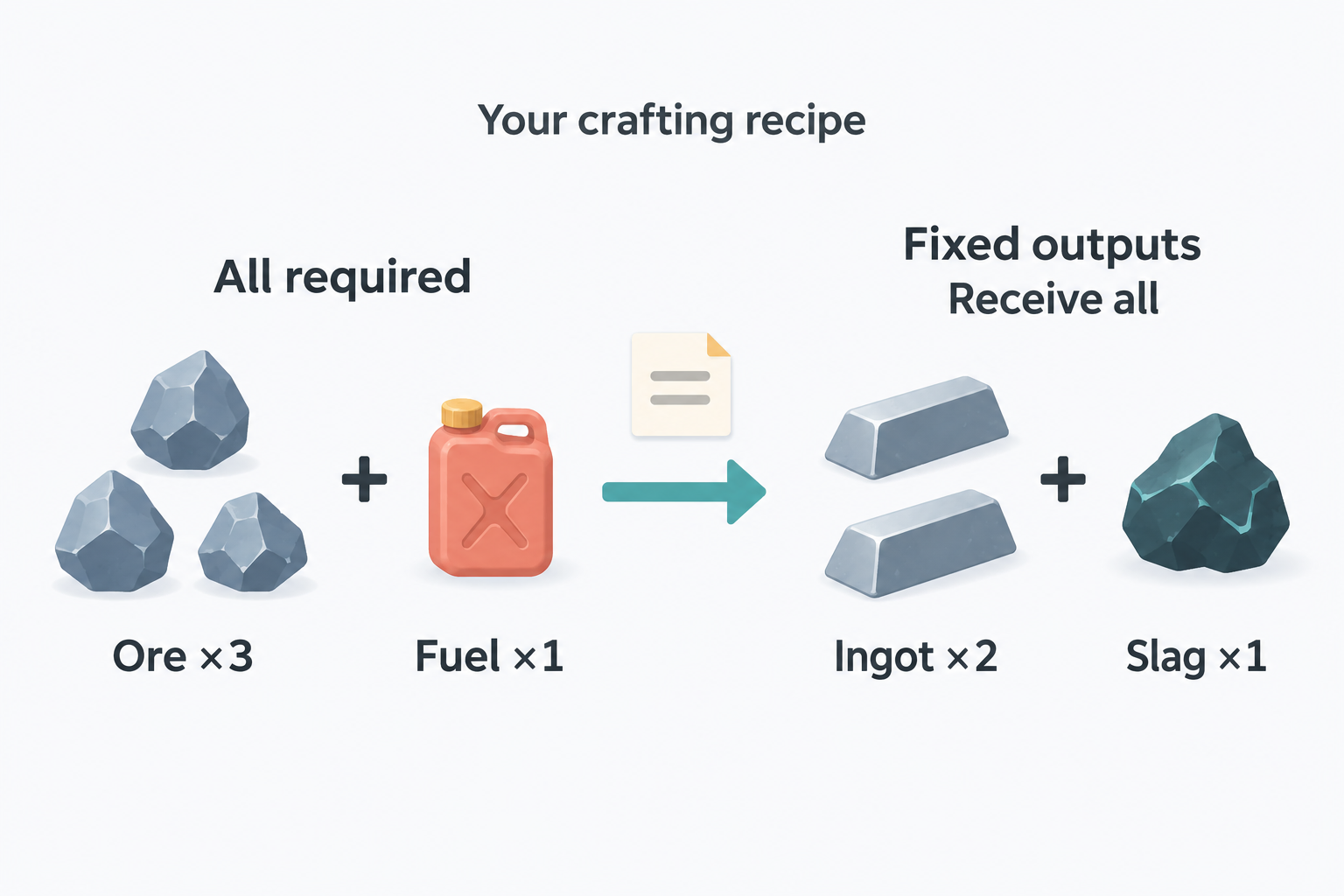
A recipe can turn several kinds of material into several kinds of output in one craft. For example, ore and fuel can produce both ingots and slag. This lets you set up exchanges, workshops, and recycling rules for your task rewards.
Start with one small recipe
Create and save every item the recipe will use, including its outputs. You do not need to own the outputs to configure them. To craft, you must already have all the required materials in Inventory.
Read the two sides of a recipe this way:
- All listed materials are required together. Ore + fuel means you need both, not either one.
- All listed outputs are received in their configured quantities. Ingots + slag gives you both; the recipe does not randomly choose between them.
- The same item can appear on both sides. Equal input and output quantities leave its final stock unchanged, but you still need to own the input before crafting.
- A batch multiplies every input and output by the craft count. Crafting does not run item use effects or automatically start another recipe.
The examples below describe the materials and outputs lists without relying on platform-specific button names. Check the quantities on both sides in your app before confirming. For a predictable test, leave materials non-usable and use collectible outputs first.
Configure and use the recipe
Try Meadow card ×3 + Card fragment ×2 → Foil card ×1. Create and save all three items first. These are custom collectibles; you can later use them in a card collection.
- Edit Foil card. Under Crafting Recipes, add a recipe that produces the current item.
- Name the recipe, such as “Foil card exchange”. In the materials list, select Meadow card ×3 and Card fragment ×2.
- In the outputs list, keep the current item, Foil card ×1. For a multi-output recipe, add the other outputs here, each with its own quantity.
- Confirm the recipe and save the item.
- Open Foil card's details in the Shop. Find the recipe that produces it, check the materials and outputs, and choose a craft count of 1.
- Choose Craft. This consumes 3 Meadow cards and 2 fragments and adds 1 Foil card to Inventory.
For two crafts, you need 6 Meadow cards and 4 fragments, and receive 2 Foil cards. Start with one craft before trying a larger batch. If you want a choice between two costs, make two recipes instead of putting both costs into the same recipe.
You can also begin from a material's editor and choose the option to consume the current item to craft others. This is useful for a recipe such as Meadow card ×3 → Card fragment ×1. Neither recipe runs the use effects of the consumed cards or the newly obtained result.
Exchange your own currencies
If everyday tasks earn coins and larger rewards cost diamonds, a recipe can connect the two. You set the rate yourself; there is no built-in exchange rate.
Coins ×100 → Diamond ×1
- Create and save Coins and Diamond as items if you have not already done so. You may already use Coins as a task reward.
- Edit Diamond and add a recipe that produces it. Name it “Exchange coins for a diamond”.
- Set the materials to Coins ×100 and the output to Diamond ×1, then save the recipe and item.
- With at least 100 coins in Inventory, open Diamond's Shop details and craft once. Coins decrease by 100 and diamonds increase by 1. Two crafts require 200 coins and give 2 diamonds.
For an optional reverse exchange, edit Coins and create a separate recipe: Diamond ×1 → Coins ×80. Exchanging 100 coins for a diamond and then exchanging it back leaves 80 coins. Check both rates before saving: a reverse rate above 100 would let this pair of recipes generate extra coins through repeated exchanges. Check longer loops too if you add more currencies.
Changing your primary currency only changes which item's quantity is displayed. It does not exchange your balance or update task rewards and Shop prices. If diamonds should come only from these recipes, turn off Purchasable on Diamond and check that tasks, effects, or other recipes do not grant it directly.
Make coffee and return the machine
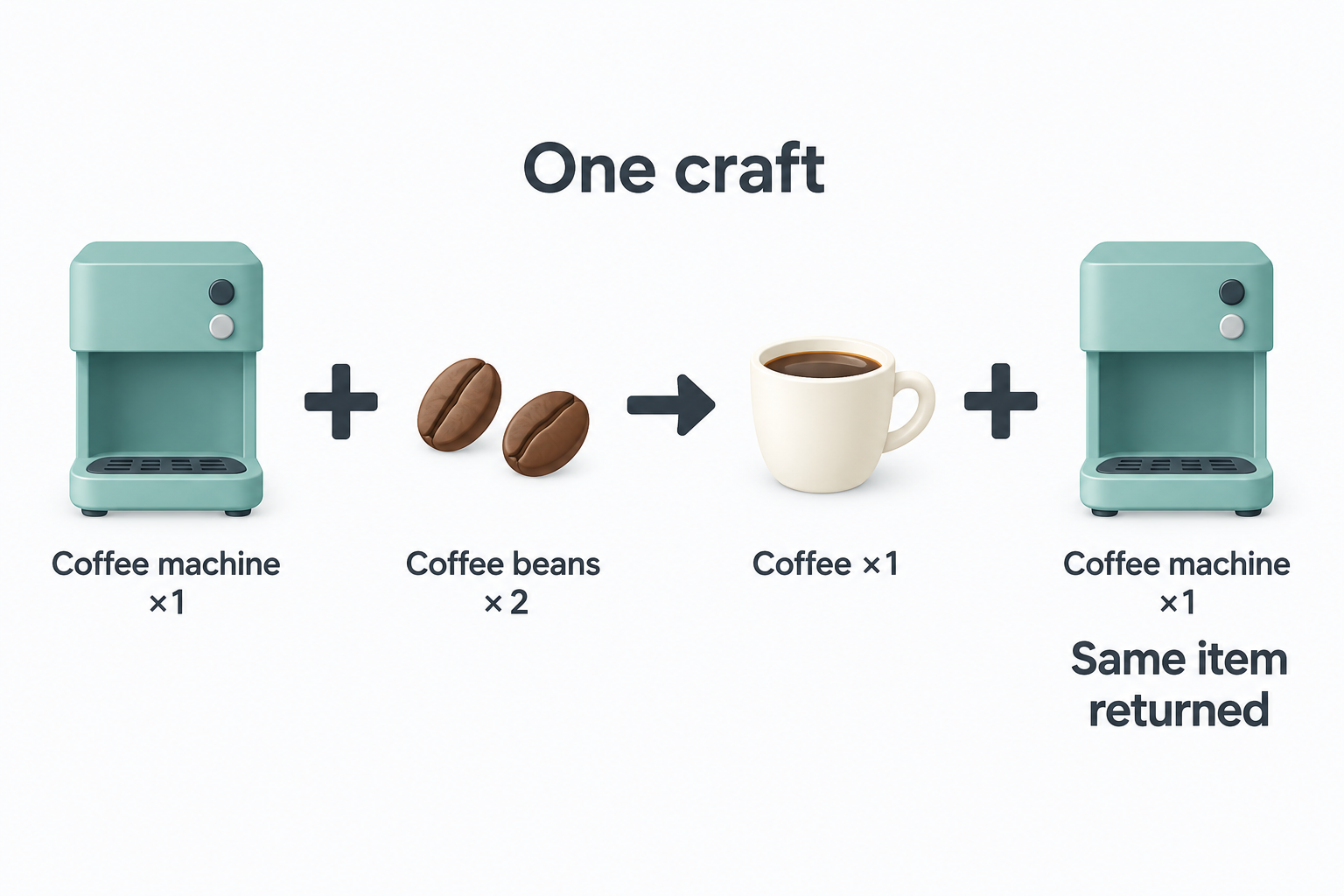
Use this when you want a tool to be required for crafting but kept afterward. The coffee machine is an ordinary item; its return is part of your recipe.
Coffee machine ×1 + Coffee beans ×2 → Coffee ×1 + Coffee machine ×1
Create and save Coffee machine, Coffee beans, and Coffee. Turn off Usable on the machine and beans so ordinary use cannot accidentally consume them. For your first test, leave Coffee non-usable too. Have at least 1 machine and 2 beans in Inventory.
- Edit Coffee. If it should only be obtained through crafting, turn off Purchasable and check other rewards for direct Coffee grants.
- Add a recipe that produces Coffee, following the recipe setup steps. Name it “Make coffee”.
- In the materials list, add Coffee machine ×1 and Coffee beans ×2.
- In the outputs list, keep Coffee ×1 and add the same Coffee machine item ×1. Select the item you used as a material; do not create another item with the same name or a separate “Returned machine”.
- Check that the machine is on both sides with quantity 1. Save the recipe and Coffee, then open Coffee's details in the Shop and craft once.
After one craft, beans decrease by 2, coffee increases by 1, and the machine's stock is unchanged. The recipe spends a machine and returns that same item; it does not mark the machine as inherently non-consumable. If you forget the machine output, crafting consumes it. If you select a different item with the same name, you spend the original and receive the other item.
Coffee does not use itself after crafting, and the machine's use effects do not run. You can later give Coffee a use effect, then use it separately from Inventory.
Common questions about returned tools
Can one machine make ten coffees? Yes, one craft at a time: with 1 machine and 20 beans, craft once, then manually repeat after the machine returns. Ten such crafts use 20 beans, add 10 coffees, and leave 1 machine.
Can I select a batch of ten with one machine? No. A single batch of 10 requires 10 machines and 20 beans up front. After that batch, you still have 10 machines and gain 10 coffees. The returned machines do not count toward the materials you must have before starting the batch.
Do I need to use the machine first? No. It only needs to be in Inventory as a recipe material. This setup does not create an automatic machine, timer, or production queue.
Keep a catalyst or collect by-products
For potion-making, you might keep a special crystal while spending ingredients:
Catalyst crystal ×1 + Herbs ×3 + Water ×1 → Potion ×2 + Catalyst crystal ×1
Start from Potion's editor, select the three materials, then keep Potion ×2 in the outputs and add the same crystal ×1. One craft spends 3 herbs and 1 water, gives 2 potions, and leaves the crystal's quantity unchanged. “Catalyst” is a name you chose, not an item property that automatically changes crafting. As with the coffee machine, a batch of two needs two crystals up front.
For processing with a by-product:
Ore ×3 + Fuel ×1 → Ingot ×2 + Slag ×1
Start from Ingot's editor and add Slag alongside Ingot in the outputs. Both are added to Inventory on each craft. You could save slag for a later exchange. This recipe has fixed outputs, with no random by-product chance or processing time.
Recycle old items or replace a basic tool
Give an old reward a new use by turning it into materials:
Old equipment ×1 → Metal sheet ×2 + Spare part ×1
Start from Old equipment's editor and choose the recipe type that consumes the current item to craft others. Add both recovery items as outputs. Crafting removes 1 old equipment and adds both materials; it does not calculate a refund from the equipment's original price.
For a replacement tool, start from Advanced axe's editor:
Basic axe ×1 + Ingot ×2 + Wood ×1 → Advanced axe ×1
The basic axe is spent, and the advanced axe is a different item. Calling it “Advanced” does not automatically improve your attributes or task rewards. Configure any use effects separately if you want the new item to do something when used.
Offer a choice of costs
If studying and exercise should offer different ways to earn a break, give Break voucher two recipes:
- Study coin ×10 → Break voucher ×1
- Exercise coin ×5 + Star ×1 → Break voucher ×1
Create both from Break voucher's editor and choose the one you want when crafting. The first spends study coins; the second requires both exercise coins and a star. Putting all three currencies into one materials list would require all three together, not offer a choice.
For recipes that feed into one another, see the manual crafting chain.
Common questions
Why can’t I craft?
Check every required material and the selected craft count. A recipe needing two kinds of material cannot run with only one kind. The details show how many crafts your inventory supports. If recipe editing is unavailable, check Premium; its restriction is separate from a shortage of materials.
Why didn’t the crafted box open?
Crafting only gives you the resulting item. Open the new box in Inventory and use it. If it has no use button, check Usable and its effects in the editor. See loot box setup or the key-and-box combination.
Before major changes to recipes and rewards, back up your data. Test with one low-cost craft before processing a batch.