Add use effects to items
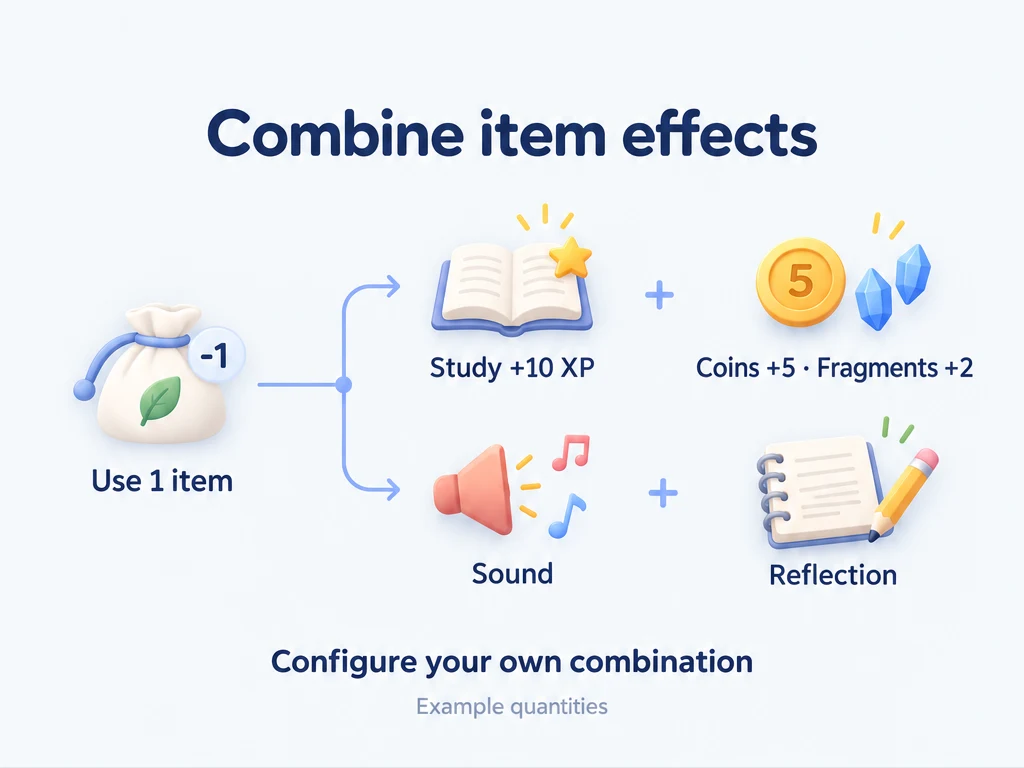
A Study XP card lets you save a reward for later. A Supply pack can give you several resources at once. A short sound can mark the moment you redeem a break.
These are items you create yourself. Choose their names, how you earn them, and what happens when you use them. The amounts below are examples, not an official reward scale. For creating and buying your first item, see Items and inventory.
Make a Study XP card
First, create the attribute you want to reward, such as Study. You also need a way to obtain the card: a task reward or a purchase price will do.
- Create or edit Study XP card in Shop.
- In the usage effects section, enable Usable, then add an effect of type Experience.
- Select Study. Leave the random option off and set the effect to increase XP by 10.
- Confirm the effect, then save the item itself.
- Award one card from a task, or buy one. Open it in Inventory, choose a use quantity of 1, and confirm use.
Your card quantity decreases by 1 and Study gains 10 XP. Buying or receiving the card alone does not grant that XP.
For a variable reward, turn on the random option and enter a minimum of 10 and a maximum of 15. Using one card then gives an integer amount from 10 to 15, including both ends. Start with fixed amounts if you want to check your reward balance easily.
Pack several rewards into one item
Create the reward items first. For this example, use Coins and a custom Material fragment. Turn off Usable on the fragment if you only want to collect it or spend it in recipes.
Edit a Supply pack, enable Usable, and add each row below as a separate effect. Keep random amounts off.
| Effect type | Target | Fixed increase per pack |
|---|---|---|
| Items | Coins | 5 |
| Items | Material fragment | 2 |
| Experience, optional | Study | 10 |
Confirm each effect and save the pack. Obtain one pack and use it from Inventory. This consumes one pack, adds 5 coins and 2 fragments, and grants 10 Study XP if you included that effect. The ordinary effects on a single item combine; they are not alternatives chosen at random.
A pack can grant another usable item, such as an XP card. The card goes into Inventory and keeps its own effects for when you use it. Receiving it does not automatically use it.
For a pack that picks one reward from a list, add an Open box effect instead. Crafting and loot boxes explains how that choice works and how to combine it with a fixed reward.
Add a sound to a Break ticket
A short chime can signal that you have redeemed a break. Importing or changing a custom use sound requires Premium. ulives Premium is a lifetime purchase; it does not expire.
- Create or edit a usable Break ticket.
- Add Play sound in the usage effects section.
- In the sound picker, import a local audio file if the list is empty. Preview it, then select it.
- Save the item. Obtain one ticket and use it when you take a break.
Using the ticket consumes it and requests playback of its selected sound. You can add this sound to the Supply pack as well; its numeric rewards still apply. Use one sound per item rather than trying to build a playlist from several sound effects.
The sound is a cue you chose. It does not start a break timer or enforce a time limit. For actions in other apps, see App integrations.
Leave a reflection after a reward
For a Movie ticket, add Record reflection to its usage effects. You can select a reflection template or leave it unset, then save the item.
After using the ticket, the reflection editor opens so you can write about the film. The item has already been used at this point. Closing the editor without saving a reflection does not return the ticket. You can combine this effect with XP or item rewards, too.
What is consumed, and when?
An item does not need extra effects to be usable. A plain Movie ticket can simply record that you took a real-world reward.
| Action | Inventory change | Use effects |
|---|---|---|
| Receive an item from a reward | Adds the awarded quantity | Do not run |
| Buy an item | Deducts its price items; adds the purchase | Do not run with an ordinary purchase |
| Use 1 item | Consumes 1 of that item | Applies its configured effects |
| Use 3 items with fixed numeric effects | Consumes 3; fixed XP and item changes are multiplied by 3 | A pack giving 5 coins gives 15 coins |
| Discard an item | Removes the discarded quantity | Do not run |
Buy and use immediately combines acquisition with use. Check Inventory before buying again if the use step did not complete. Batch use of loot boxes makes multiple draws, but do not expect a separate sound or reflection window for every unit in a batch.
An item can also reduce XP or another item's quantity. In a numeric effect, choose a decrease, or set a random range containing negative values. This is an additional cost on top of consuming the item itself. Enable Prevent Negative for deductions you want to block when the target balance is insufficient. For a random deduction, the check allows for the largest possible loss, not only a favorable result.
Do not rely on a positive effect on the same item to fund a protected deduction. Check that the required balance is already available before use. For a simple materials-for-reward exchange, a crafting recipe is easier to inspect.
Common questions
Why is there no change after I buy the card?
A normal purchase only places the card in Inventory. Use it to grant its XP. If it has no use button, edit it and check that Usable is enabled.
Why can’t I use it?
Check your quantity, the quantity selected for use, and any Prevent Negative settings on deductions. Confirm that each effect points to the intended attribute or item, and that you saved both the effect and the item.
Why can’t I hear the sound?
Preview the selected file and check that it is still available. Check the app's general and item-use sound settings, along with device volume. Re-import or select another file if the editor reports a missing sound. Silence does not prove the item was not consumed. Check Inventory and activity records before using another one to retry.
Can I undo a use?
There is no one-step undo for item use. Check the confirmation and try one low-cost example before using a batch, especially if effects deduct resources or trigger another app. Keep a backup before making large changes to your reward system.