My Day
You have time to read at lunch and walk after work. Add “Read 10 pages” from Study and “Walk 20 minutes” from Health to My Day so you can work from one list. Both tasks stay on their original regular lists.
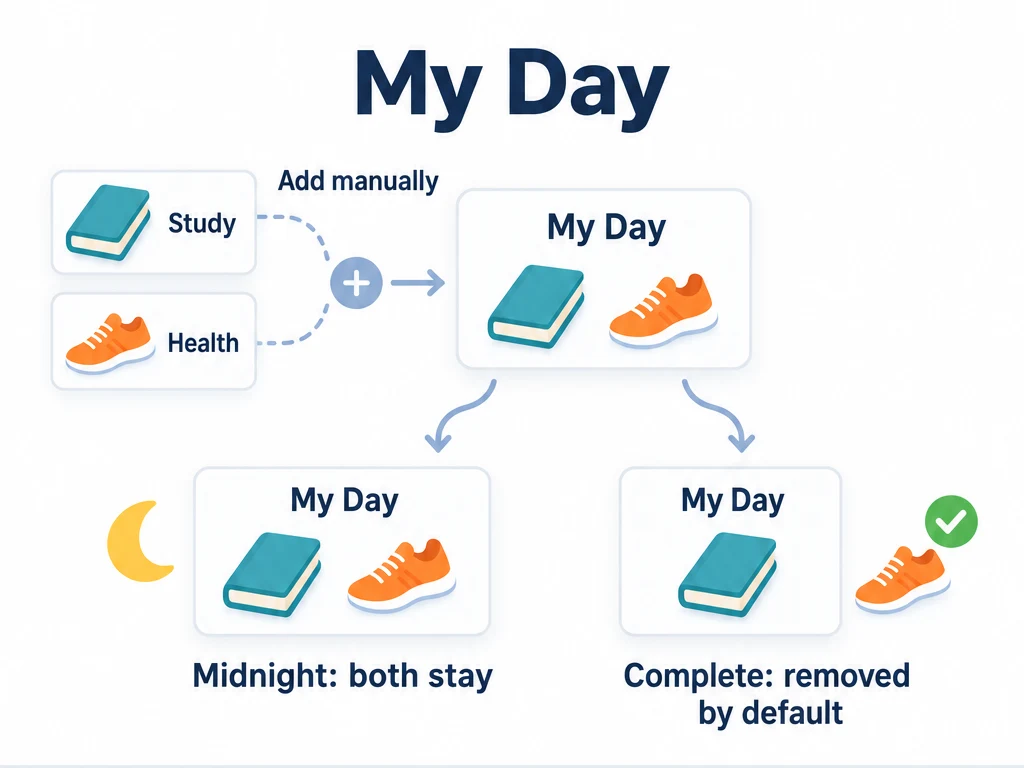
Pick what you want to work on
My Day is a built-in smart list whose tasks you choose manually. You can add something due next week if you want to start today, or leave out a task you are not planning to work on yet.
For an automatic view of deadlines, use Due Today Only or Due Today and Overdue instead. Their date rules determine what appears; adding or removing something in My Day does not change those lists. See Built-in smart lists.
Add the tasks for today
On Study, long-press “Read 10 pages” and choose Add to My Day. Do the same for “Walk 20 minutes” on Health, then open My Day to see both tasks.
You can also tap + inside My Day and choose Choose Existing Tasks or Create New Task. A new task still needs a regular list to store it on; see Create and manage tasks. In task edit, the Add to My Day option adds this extra view without changing the regular list.
If your plans change
Long-press the task and choose Remove from My Day, or turn off Add to My Day in task edit. This removes it from your focus list only. Its original regular list and history remain intact.
Keep completed tasks visible, or clear them as you go
By default, Automatically remove after completing the task's current period is enabled. When you finish today's walk, it leaves My Day, while its record stays on Health.
If you prefer to see what you have finished, open Manage List, edit the My Day smart list, and turn off that option. Completed tasks then remain until you remove them manually.
My Day does not clear at midnight. An unfinished task can stay there for tomorrow; automatic removal is tied to completing its current period.
You can also read the in-app explanation under Manage List → My Day → About My Day.
Common questions
Does finishing a task here also finish it on its regular list?
Yes. My Day shows the same task, so completion is reflected on its original list too.
Why didn't a task due today appear here?
My Day only shows tasks you add. Use the due-date smart lists when you want ulives to gather everything matching a deadline automatically.