Subtasks
A subtask can be a step you must finish, an optional challenge, or one of several ways to earn a reward. For a packing checklist, every step may matter. For a morning routine, you might want to reward getting up earlier without requiring every time bracket to be checked.
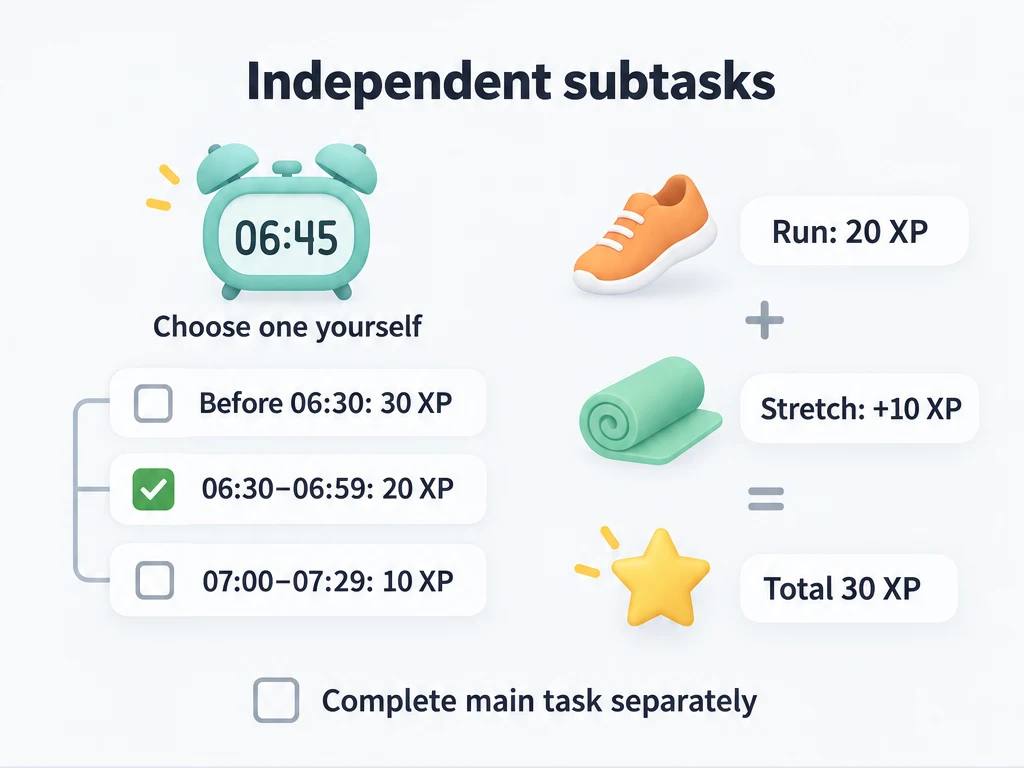
Start with independent subtasks
Use Independent when the subtasks are optional or describe alternatives. You can reward the steps you actually did, then finish the main task without checking the rest. Each subtask can have its own experience and item rewards.
The examples below use fixed experience rewards. Choose an attribute to receive them, and leave the main task's rewards empty if you want only the selected steps to pay out. The numbers are suggestions for your own game, not an official reward scale.
Add steps and choose a rule
- Open the main task in task edit. If it is new, give it a name and choose its normal list.
- Under Subtasks, choose Add Subtask, enter a title, and set any rewards you want that step to give. Save the subtask and repeat for the other steps.
- Choose Independent as this task's completion rule for the alternatives below. Save the main task.
- Check only the subtasks you did. When you are ready to close the period, complete the main task separately.
The profile default is Independent. You can change it under Settings → Tasks → Subtask completion rules. Tasks without a rule of their own follow that default, including when you change it later. Setting Independent on these example tasks keeps them independent even if you later change the default.
A task-specific rule is saved only while the task has at least one subtask. If you remove every subtask and save, the override is removed too. Adding steps later uses the profile default until you choose a task-specific rule again.
Reward an earlier start
Create a task called "Morning start" with the following subtasks. If you want a fresh set each day, add a daily repeat rule.
| Subtask title | Experience reward |
|---|---|
| Up before 06:30 | 30 |
| Up from 06:30 to 06:59 | 20 |
| Up from 07:00 to 07:29 | 10 |
| Up at 07:30 or later | No reward |
At 06:45, check only the second subtask: it grants 20 experience. Then complete Morning start. With Independent, the other brackets remain unchecked.
Choosing one bracket is your own rule. The app does not read your wake-up time or make these checkboxes mutually exclusive. If you check both the first and second subtasks, both can give their rewards, for a total of 50 experience. Do not use Complete all subtasks for this setup.
Choose a run that fits the day
For "Today's run," add alternatives for the total time you actually ran:
| Subtask title | Experience reward |
|---|---|
| Run for 10 to 19 minutes | 10 |
| Run for 20 to 29 minutes | 20 |
| Run for at least 30 minutes | 30 |
After a 25-minute run, check the 20-minute bracket only. These are alternatives, so the 10-minute bracket is not an extra reward. Record the duration yourself; writing minutes in a title does not start a timer or detect a run.
Add "Stretch after the run" as a separate bonus challenge worth 10 experience. This one is additive: a 25-minute run plus stretching gives 20 + 10 = 30 experience. Skipping the stretch does not stop you from completing the main task under Independent.
If you would rather record 25 as a number, or earn a reward for every minute, use a counter task.
Use A/B/C/D to rate a session
A task called "Review today's lesson" can have four outcome subtasks. Write a rule you can judge at the end of the session:
| Grade and subtask title | Experience reward |
|---|---|
| A: Answer 3 review questions correctly without notes | 30 |
| B: Answer 2 correctly without notes | 20 |
| C: Answer 1 correctly without notes | 10 |
| D: No correct answers yet; record the attempt | No reward |
Check one grade, then finish the main task. With Independent, a C is a recorded result with 10 experience; you do not need to check A or B. The app does not grade your answers or prevent you from selecting multiple grades.
Combine the choices into a 100-point day
You can put these choices under one daily task called "My 100-point day" instead of keeping separate morning, running, and study tasks. Use Independent and give every rewarded subtask experience for the same attribute. Keep the main task's rewards empty.
Your scoring convention is:
- Choose one wake-up bracket, worth up to 30.
- Choose one running bracket, worth up to 30. If you did not run for 10 minutes, leave all running brackets unchecked.
- Choose one study grade, worth up to 30.
- Add the 10-point stretching challenge if you did it.
For example, waking at 06:45, running for 25 minutes, earning grade B, and stretching gives 20 + 20 + 20 + 10 = 70 experience. Finish the main task to close the day even though some alternatives remain unchecked.
The 100-point maximum comes from following this convention. It is not an enforced limit or a weighted progress display. The attribute accumulates experience across days, and checking subtasks does not add numbers to a main-task counter. For a numeric 70/100 record, use a separate counter task and enter 70 yourself; avoid giving both tasks rewards for the same work unless you intend to reward it twice.
Which rule fits your checklist?
| Rule | Example use | What happens when you complete the main period |
|---|---|---|
| Independent | Alternative scores and optional challenges | The main period completes immediately. Unfinished subtasks stay unchanged, without a warning. |
| Warn before completing | A packing list with some optional items | The app asks if steps remain unfinished. You can confirm to complete the main period; those steps stay unfinished. |
| Require all subtasks | A pre-trip check where every step matters | Completion is blocked until all subtask periods are completed. A confirmation cannot bypass it. |
| Complete all subtasks | A routine you have finished in full and want to check off together | The same action completes unfinished subtask periods and then the main period. |
Check off a whole routine together
With Complete all subtasks, completing the main period also completes the unfinished steps. If instead you check steps off one at a time, completing the last open subtask can automatically complete the main period in the same action, provided the main period is still pending.
Completing steps together also grants their rewards. Use it for a routine where every step was actually done, such as packing clothes, charging devices, and checking travel documents. With the alternative wake-up brackets above, it would complete the unchosen brackets and grant their rewards too.
The same rules apply when you confirm pending-confirmation periods. For settlement details, see Rewards, penalties, and pending confirmation; for recurring periods, see Repeat and advance.
Common questions
I changed the default, but one task still behaves differently. Why?
Check whether it has its own completion rule. Only tasks without a separate rule follow the profile default.
Why can't I confirm past unfinished steps?
Require all subtasks has no confirmation bypass. Complete the steps first. Warn before completing is the rule that lets you confirm while leaving steps unfinished.
Why did two alternatives both give rewards?
Independent does not mean "choose exactly one." Each checked subtask can settle its own reward. Follow the one-choice convention yourself, and check the task's reward settings if the main task also gives experience or items.
Why doesn't finishing the selected steps finish the main task?
Under Independent, complete the main task separately. Changing to Complete all subtasks would also complete and reward the alternatives you deliberately left unchecked.